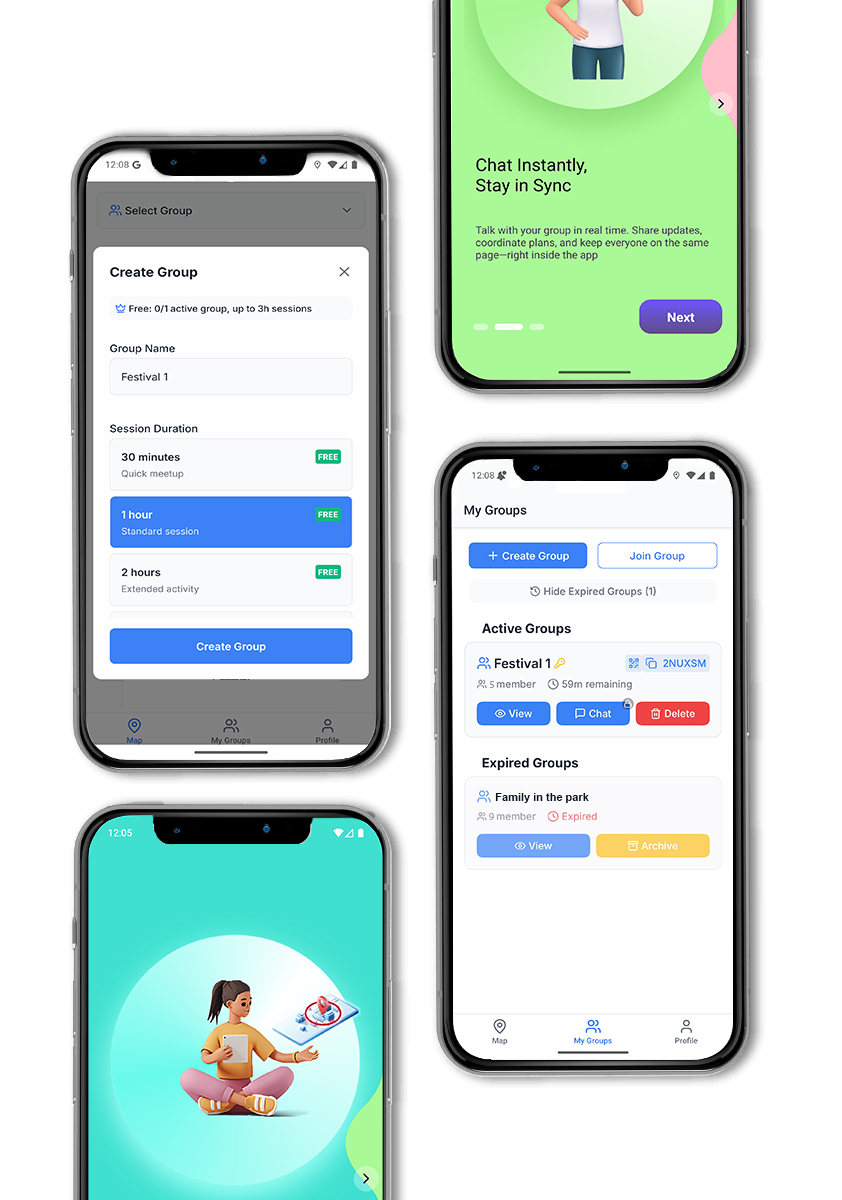
in-app Help & FAQ screen
Based on the live site at https://peerpin.app/ and the full app feature set.

Getting Started
A: PeerPin is a real-time group location-sharing app. It lets you see where your friends, family, or crew are on a live map — perfect for festivals, theme parks, road trips, and any crowded event. No more “Where are you?” texts.
A: Yes. PeerPin has a free tier that covers core location sharing and basic group features. Optional Plus and Pro subscription plans unlock additional capabilities like extended history, larger groups, and premium chat features.
A: Download PeerPin, create a free account with your email (or sign in with Google/Apple), complete the short onboarding, then create or join a group.
Q: Which platforms is PeerPin available on?
A: PeerPin is available on iOS and Android. Download it from the App Store or Google Play at Download.
A: Tap Sign Up on the login screen. Enter your email, choose a password, and pick a display name. You’ll receive a verification email — tap the link or enter the code to activate your account.
Q: I didn’t receive my verification email. What should I do?
A: Check your spam or junk folder first. Then tap Resend Code on the verification screen. Make sure you entered the correct email address. If the problem persists, contact us at peerpin.app/contact.
A: Yes. Tap Continue with Google or Continue with Apple on the login screen for one-tap sign-in.
A: On the login screen, tap Forgot Password, enter your email address, and follow the reset link sent to your inbox.
A: Go to Profile → Edit Profile, update your email, and confirm the change via the verification link sent to your new address.
Q: How do I delete my account?
A: Go to Profile → Account Settings → Delete Account. This permanently removes your data. This action cannot be undone.
A: Once you join a group and grant location permission, your position is shared live on the map with other group members. You can see everyone’s location update in real time.
A: Only when you have an active group session and background location is enabled. You can toggle background location from Profile → Permissions at any time.
A: Leave the active group or toggle off location sharing from the map screen. Your location will no longer be visible to other members.
A: Make sure location permissions are set to Always (for background) or While Using App in your device settings. A poor GPS signal or disabled GPS can also cause delays. Try stepping outside or restarting the app.
A: No. Your location is only visible to members of groups you have actively joined. PeerPin never shares your location with third parties.
A: On the Map or Groups tab, tap Create Group, give it a name, and set an expiry time. Share the generated invite code or QR code with your crew.
A: Tap Join Group and enter the invite code, or scan the group’s QR code. You can also open a `peerpin://join?code=XXXXXX` deep link shared by another member.
A: The free tier supports small groups. Plus and Pro plans allow larger group sizes. See Profile → Subscription for current tier limits.
A: Groups have a configurable expiry time set by the creator. Expired groups move to the Expired section in the Groups tab but can be viewed for reference.
A: Open the group, tap the member’s name, and select Remove from Group. Only the group creator or an admin can remove members.
A: The group becomes inactive — location sharing stops and it moves to the Expired tab. No data is deleted immediately.
A: Yes. You can be a member of multiple active groups simultaneously.
💬 Chat
A: Each group has a dedicated real-time chat. Tap the chat icon from the Groups tab to open it. Messages, images, and emoji reactions are all supported.
A: Yes. Tap the image icon in the chat bar to pick a photo from your library.
A: Recent messages are cached locally on your device. Full chat history availability depends on your subscription tier.
A: Make sure notification permissions are enabled in Profile → Permissions and that you haven’t muted the group. Check that your device’s Do Not Disturb mode is off.
A: The SOS button on the map sends an emergency alert to all members of your active group. It triggers an alarm sound on their devices and highlights your location so your crew can find you quickly.
A: Tap the SOS button on the main map screen and confirm. The alert is sent instantly to all group members.
A: Tap Dismiss on the alert banner or notification. The sender can also cancel the SOS from their map screen.
A: PeerPin offers three tiers:
– Free — Core location sharing, basic groups
– Plus — Larger groups, extended chat history, priority features
– Pro — All Plus features, advanced controls, and premium support
A: Go to Profile → Subscription → Upgrade and select your preferred plan. Payment is handled securely through the App Store (iOS) or Google Play (Android).
A: Subscriptions are managed by the App Store or Google Play. Go to your device’s subscription settings to cancel. Your plan remains active until the end of the current billing period.
A: Refund requests are handled by Apple (App Store) or Google (Play Store) according to their respective policies. Contact the relevant store support for assistance.
A: Your account and groups remain intact. Features exclusive to paid tiers will no longer be accessible until you resubscribe.
A: Ads help keep PeerPin free for everyone. You may see banner or interstitial ads while using the free plan.
A: You can voluntarily watch a short ad to support PeerPin and unlock temporary perks. Tap Support PeerPin in the Profile tab to watch a rewarded ad.
A: Upgrading to a Plus or Pro subscription removes ads entirely.
A: PeerPin collects location data (only when in an active group session), your display name, email, and app usage data to improve the service. See our full Privacy Policy at peerpin.app.
A: Yes. All data is transmitted over HTTPS with SSL/TLS encryption. PeerPin also uses SSL pinning to protect against network-level attacks.
A: Yes. Go to Profile → Data & Privacy to view your data transparency information.
A: No. PeerPin does not sell personal data to third parties.
A: Check your internet connection. Try closing and reopening the app. If the issue persists, toggle Airplane Mode on and off to reset the network.
A: Close background apps on your device, restart PeerPin, and make sure you’re on the latest version. Clearing the app cache (Android: Settings → Apps → PeerPin → Clear Cache) can also help.
A: Updates are delivered automatically via the App Store or Google Play. You can check for updates manually in the respective store.
A: Make sure your OS and PeerPin are both up to date. Uninstalling and reinstalling the app often resolves persistent crashes. If the issue continues, report it via peerpin.app/report.
A: PeerPin couldn’t reach its servers. Check your Wi-Fi or mobile data connection. If your connection is fine, there may be a temporary server issue — try again in a few minutes.
A: Yes. PeerPin supports multiple languages. Change your language preference in Profile → Language.
A: Go to Profile → Appearance and toggle the theme. PeerPin also respects your device’s system theme by default.
A: Visit peerpin.app/report or email us through the contact form at peerpin.app/contact. Please include your device model, OS version, and a description of the issue.
A: Visit peerpin.app/report to submit a user report. Include as much detail as possible.
A: We’d love to hear your ideas! Head to peerpin.app/about — tap Have a Question or Idea? Let’s Talk to get in touch.
A: Visit peerpin.app or follow us on social media for updates, tips, and feature announcements.